
Schedule
Build a first-pass shooting schedule from your script, with dated pre-production, shoot days and post, ready to talk through with your first AD.
Four Steps to Your First Schedule
Schedule is included on Screen Ignite, Ember and Radiant. Start with your screenplay as a PDF.
Open Schedules and upload your script
Choose your reports
Set up your shoot
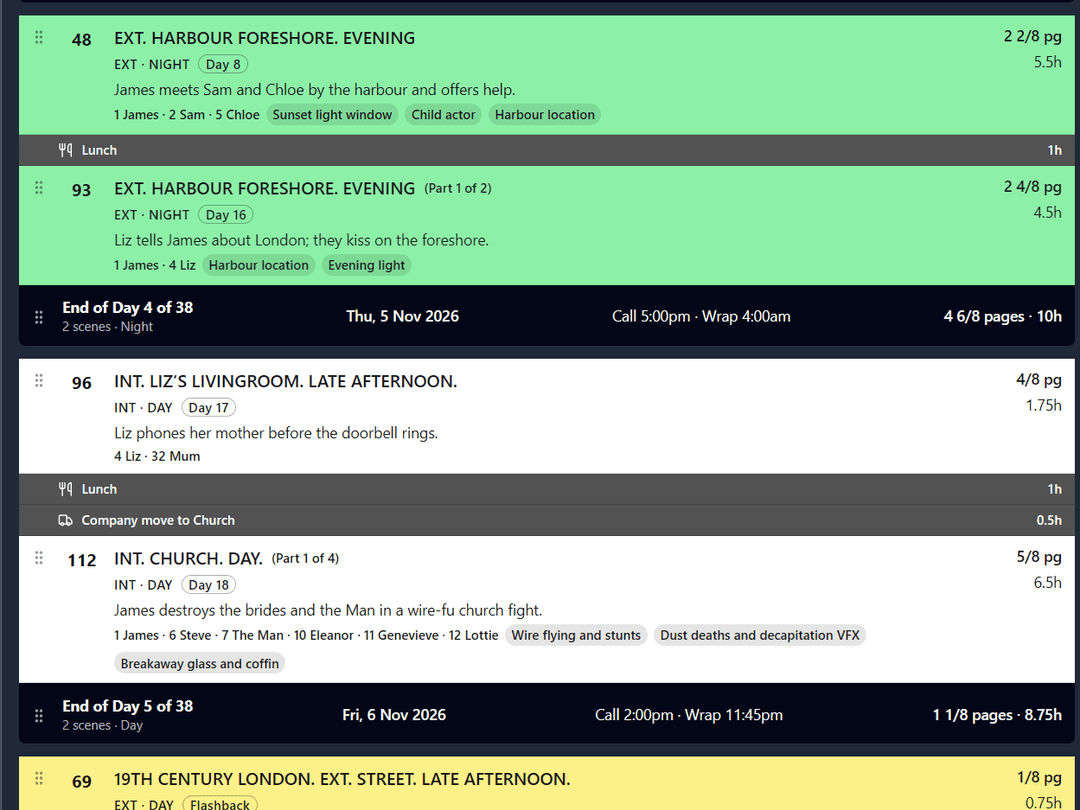
Review your stripboard
Good to Know
Night shoots handled
Night scenes are grouped into night weeks, and call times are set from sunset at your shoot location.
Rest built in
Turnaround and days off follow standard rest rules, so your schedule is one your cast and crew can actually work.
Lunches and company moves
Every day shows lunch, any move between locations, call and wrap times, and the pages and hours it covers.
Feeds your budget and cash flow
A Script-based Budget is priced from your production scope analysis, script breakdown and schedule, and your Cash Flow can fill itself in from the schedule's weeks.
Schedule Questions
Common questions about building a shooting schedule with loqyn.