
Quick Start Guide
Finance Plan
Get up and running in minutes.
Three Steps to Your First Finance Plan
loqyn streamlines the entire finance planning process from budget to investor-ready outputs.
1
Build Your Budget (if linking)
Set up your project foundation by establishing your workflow:
Enter your target production spend. loqyn's Target Budget instantly generates a detailed, balanced line-item budget calibrated to industry-standard cost ratios and your project parameters.
2
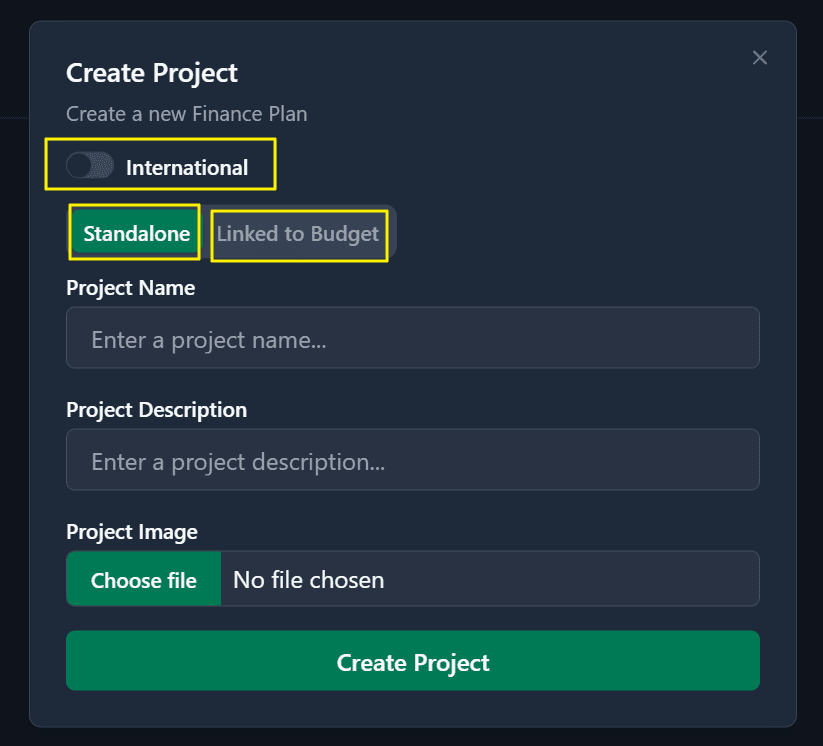
Create your Project
Set up your project foundation by establishing your workflow:
- Link to a Budget – Connect your Finance Plan to an existing loqyn budget for automatic population
- International Finance Plan – This option uses editable generic line items
- Standalone Finance Plan - Build from scratch with manual entry while loqyn auto-calculates totals and populates default fields
3
Review & Adjust Auto-Generated Categories
loqyn does not use AI to generate budgets, we generate line item categories based on industry proven cost ratios and benchmarks. But every production is unique. Take a few minutes to review and adjust line items depending on your expectations for that finance category.